Chainphoria3.0.2
Publisher Description
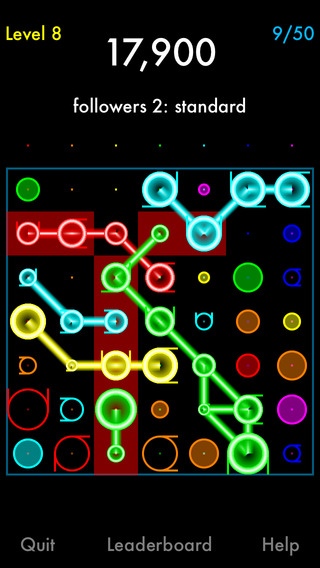
Chainphoria was made by the developer of DropZap and DropZap 2. It is a color matching game with elaborate chain reactions.
GAME TYPES
Fallers
Flyers 1
Followers 1
Flyers 2
Followers 2
GAME MODES
Each of the game types has these game modes:
Learn
Standard
Relentless
Cooperative (on same device)
Standard
Relentless
Competitive (on same device)
Standard
Relentless
CONTROLS
Tap a column to make a move.
Hold/drag to see how chain reactions for various columns start.
FEATURES
Game Center leaderboards for standard and relentless modes
universal app
support for iPhone 5 display
falling debris
ACKNOWLEDGMENTS
Uses Cocos2d v3.
Cocos2d Copyright (c) 2008-2011 - Ricardo Quesada and contributors
Copyright (c) 2011-2014 - Zynga Inc. and contributors
Kazmath Copyright (c) 2008, Luke Benstead.
All rights reserved.; license: https://github.com/Kazade/kazmath/blob/master/LICENSE.md
CocosBuilder Reader Copyright (c) 2010-2011 - Viktor Lidholt
Copyright (c) 2011-2012 - Zynga Inc. and contributors
Chipmunk Copyright (c) 2007-2014 Scott Lembcke and Howling Moon Software
ObjectAL Copyright (c) 2009 Karl Stenerud. All rights reserved.
Requires iOS 8.0 or later. Compatible with iPhone, iPad, and iPod touch.
About Chainphoria
The company that develops Chainphoria is Amir Michail. The latest version released by its developer is 3.0.2.
To install Chainphoria on your iOS device, just click the green Continue To App button above to start the installation process. The app is listed on our website since 2013-06-25 and was downloaded 8 times. We have already checked if the download link is safe, however for your own protection we recommend that you scan the downloaded app with your antivirus. Your antivirus may detect the Chainphoria as malware if the download link is broken.
How to install Chainphoria on your iOS device:
- Click on the Continue To App button on our website. This will redirect you to the App Store.
- Once the Chainphoria is shown in the iTunes listing of your iOS device, you can start its download and installation. Tap on the GET button to the right of the app to start downloading it.
- If you are not logged-in the iOS appstore app, you'll be prompted for your your Apple ID and/or password.
- After Chainphoria is downloaded, you'll see an INSTALL button to the right. Tap on it to start the actual installation of the iOS app.
- Once installation is finished you can tap on the OPEN button to start it. Its icon will also be added to your device home screen.
